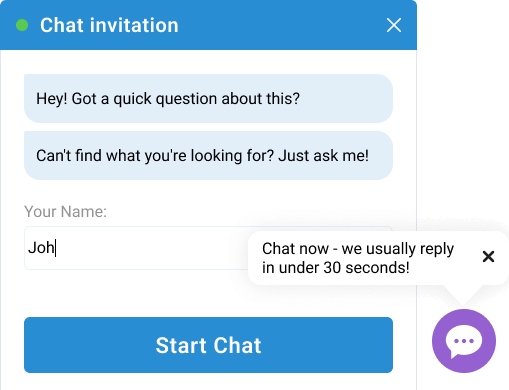
In the early days of live chat, the passive support model was the standard. A small widget sat quietly in the bottom-right corner of a website, waiting for a frustrated user to click it.
However, various studies prove that waiting is a losing strategy. Almost all successful businesses have pivoted to proactive engagement. However, there is a fine line between being a helpful concierge and a digital nuisance.
Check our tips on how to master the proactive invite to turn casual browsers into loyal customers.
Optimize for mobile users
A growing number of global buyers access websites primarily through mobile devices. A large, intrusive pop-up that covers the entire screen and forces mobile users to close it to continue browsing. On the other hand, a small unobtrusive eyecatcher bubble will draw attention and deliver information.
At the same time, keep the text short and sweet. Mobile users don't want to read a paragraph. Long texts will increase the size of the eyecatcher bubble and cover the content of the page your visitors are browsing.
Make your timing unobtrusive
If you trigger a chat invitation the millisecond a page loads, you aren't helping; you're interrupting. Conversely, if you wait until they start leaving, you will miss the lead.
In the Provide Support Live Chat service, the eyecatcher can be customized:
- Set the delay to display it for at least 30 seconds
- Select the frequency: on each page load, next visit, or every XX seconds
Make the chat invitation look like a part of your website
The chat invitation that does not match your website design will look like a third-party pop-up and will be ignored or closed. However, if you customize it by choosing the right color scheme, your visitors will trust it and click to chat with your live chat agent.
Provide Support allows tuning the appearance of both the eyecatcher and proactive chat invitation to look like a part of your website. You can set the background, border and text color for the eyecatcher and even upload your own design for the proactive chat invitation.
Test your messaging
What works for a SaaS company won't work for a law firm. First, test the persona. Does your audience prefer a formal tone ("A representative is available to assist you") or a casual one ("Hey! Got a quick question about this?")? Then test the offer. For example, if a free demo invite converts better than a quick chat invite. This will help you to find the golden mean.
You have less than two seconds to catch a user's attention. Your bubble text should be a valuable proposition rather than a greeting. If a user closes your eyecatcher, do not show it to them again on the next page. Respect their choice to browse in peace, and they will be more likely to return to the chat when they actually have a problem.
The bottom line
Modern internet users have developed a psychological filter known as banner blindness. We are so accustomed to ignoring ads and pop-ups that we often miss the very tools designed to help us.
A static chat icon quickly blends into the background. An eyecatcher bubble, however, breaks this pattern. By adding a small, vibrant, and contextually relevant call-out, you signal to the user that there is a living, breathing resource ready to assist.
